
The WT32-ETH01 pinout diagram shows all GPIO pins, power pins and communication interfaces of the ESP32 Ethernet board.
This guide helps you understand how to connect sensors, modules and network devices correctly.
WT32-ETH01 Pinout Diagram
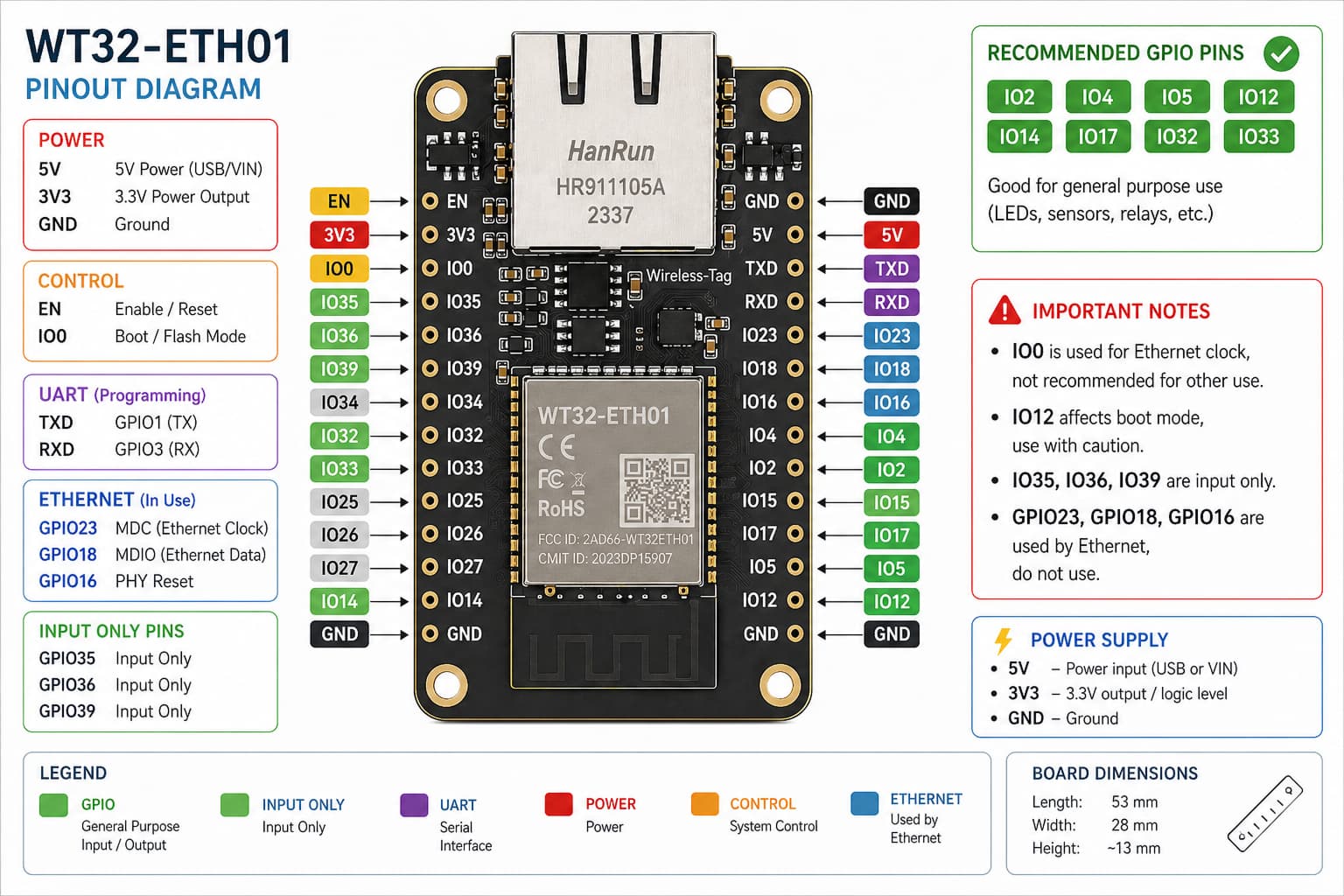
This WT32-ETH01 pinout diagram shows GPIO pins, power pins and communication interfaces including SPI, I2C and UART.
Understanding the pin layout helps you safely connect modules and avoid wiring mistakes.
WT32-ETH01 GPIO Explained
Power Pins
- 5V – power input
- 3.3V – regulated output
- GND – ground
GPIO Pins
WT32-ETH01 provides multiple GPIO pins that can be used for digital input, output and communication.
Some pins are used internally by the Ethernet interface, so check pin availability before connecting external modules.
Communication Interfaces
- I2C – for sensors
- SPI – for high-speed devices
- UART – for serial communication
WT32-ETH01 GPIO Layout
WT32-ETH01 GPIO layout is flexible, but some pins are reserved for Ethernet functionality.
Always verify pin usage before wiring your project.
Important Notes
- Use 3.3V logic for GPIO
- Do not connect 5V directly
- Ensure stable power supply
- Check Ethernet pin usage
- Verify wiring before powering
WT32-ETH01 Board Overview
WT32-ETH01 is an ESP32-based Ethernet board designed for stable wired connections. It is commonly used in IoT systems, automation and network applications.
Related Guides
📶 ESP32 Mini Guide
Ultra-compact ESP32 board with WiFi.
🔊 PCM5102A DAC Guide
I2S audio decoder module for Raspberry Pi.
🌐 WT32-ETH01 Guide
Ethernet ESP32 setup and usage
Explore More Guides
Looking for more microcontroller tutorials? Explore our guides to find the best board for your project.